
# Introduction to Promises
# Learning Objectives
After completing this section, you'll be able to:
- Use Promises to write cleaner, more readable asynchronous code.
- Use the browser's built-in
fetch()function to retrieve data from a remote API. - Build your asynchronous code as pipelines of pure functions, a.k.a. Promise chains.
- Wrap synchronous APIs in Promises to use in Promise chains.
- Coordinate multiple, interdependent Promise chains.
- Handle exceptions thrown inside of your functions.
- Use
Promise.all()to wait for multiple Promises to finish.
# Lesson
# What is Asynchrony
Asynchrony, in computer programming, refers to the occurrence of events independent of the main program flow and ways to deal with such events. These may be "outside" events such as the arrival of signals, or actions instigated by a program that take place concurrently with program execution, without the program blocking to wait for results. Asynchronous input/output is an example of the latter cause of asynchrony, and lets programs issue commands to storage or network devices that service these requests while the processor continues executing the program. Doing so provides a degree of parallelism. - Wikipedia on Asynchrony (computer programming)
# What is a Promise?
A Promise...
- provides alternative to using callback for writing asynchronous code
- represents a value that will eventually arrive
- is an object with a
.then()method and a.catch()method- and it has a
statusproperty with one of the following values:pendingfulfilledrejected
- and it has a
# How do you use a Promise?
The easiest way to work with Promises is by using the browser's built-in fetch() function, which provides a convenient way to retrieve data from an API. fetch() does its work in the background, allowing your code to display fresh data without requiring the user to reload the page.
Open the Dev Tools and click on the Network panel. Press the Escape key to open the Console drawer. You will be able to write code in the Console while seeing the traffic in the Network panel.
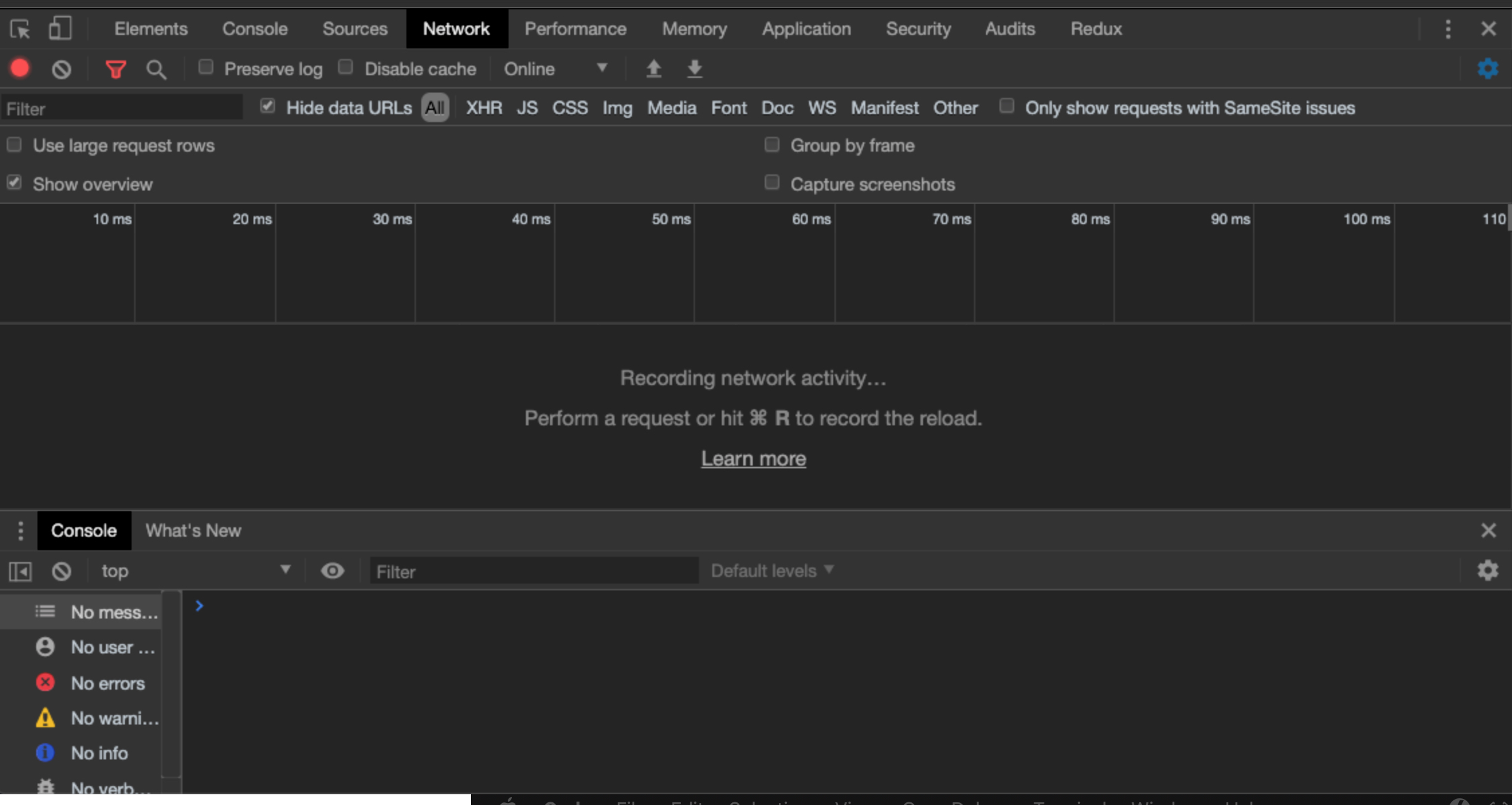
Enter the following code in the Console:
fetch(`https://anapioficeandfire.com/api/characters/583`);
You should see something similar to this:
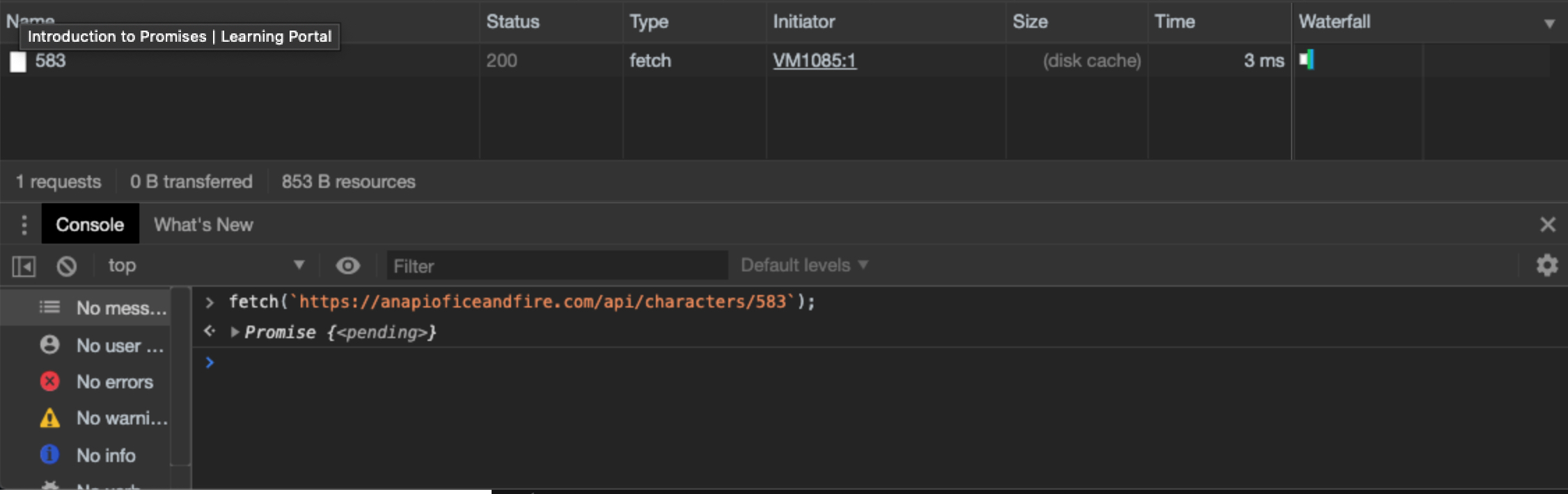
fetch() immediately returns a Promise, even though no data has been received from the server yet. At this point, the Promise's status is pending.
If it receives a valid value, the Promise moves to the fulfilled state. If there is a problem and an Exception is thrown, the Promise moves to the rejected state.
# How do you access the eventual value with .then()?
When fetch() requests data from the API, it creates a Promise object. The job of this Promise object is to wait for the API to send a response back. This allows the browser to continue running other code in the meantime.
You can give the Promise a list of instructions that it will execute whenever the response data has arrived. To do this, you call the Promise's .then() method, passing it a function that contains these instructions.
In addition, your function can expect to receive an argument. When working with fetch(), this argument is the response object. Using the response object, you can access the JSON data produced by the API.
Enter the following code to retrieve the JSON data from the response, and then console.log() it. (Make sure to brush up on arrow function syntax before continuing.)
fetch(`https://anapioficeandfire.com/api/characters/583`)
  .then(response => response.json())
  .then(data => console.log(data))
2
3
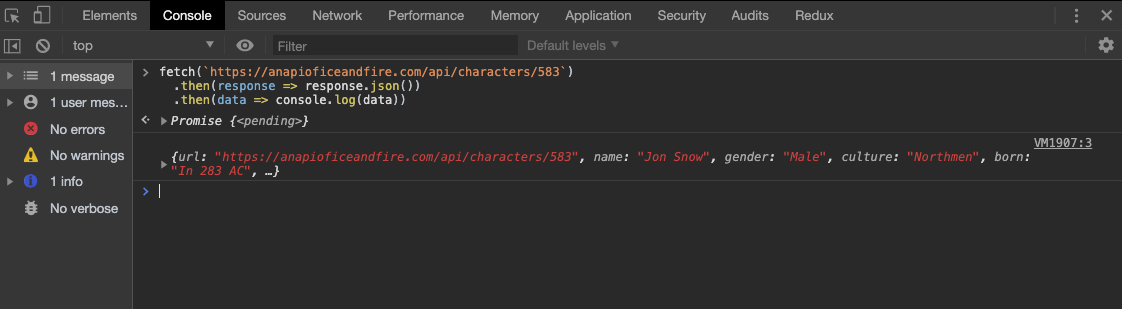
We needed to call .then() twice: once to access the JSON version of the data from the response, and a second time to do something with that data.
Here is what you might see on the Console after running this new code:
TIP
It may seem odd that you have to call .then() twice just to get to the data.
But this is because fetch() is primarily for making network requests, and it assumes that your code may need to the read the HTTP headers or status code.
# Why do you pass a function to .then()?
.then() accepts a single argument: a function.
This design choice makes working with Promises flexible. Here is a modified version of the code that creates individual functions for retrieving the JSON from the response and for outputting the data to the Console. In addition, it adds functions that get the value of the aliases key and print each alias to the Console.
const getJSON = response => response.json();

const logData = data => {
  console.log(data);
  return data;
};

const extractAliases = character => {
  const {aliases} = character;
  return aliases;
};

const printAliases = aliases => {
  for (let a of aliases) {
    console.log(a);
  }
};

fetch(`https://anapioficeandfire.com/api/characters/583`)
  .then(getJSON)
  .then(logData)
  .then(extractAliases)
  .then(printAliases)
2
3
4
5
6
7
8
9
10
11
12
13
14
15
16
17
18
19
20
21
22
23
It starts by defining helper functions, each of which does a small part of the processing of the data returned by the server. It culminates in a "Promise chain" that uses each function as part of a series of .then() calls.
The Promise chain now reads like a list of steps, written in plain English.
TIP
.then() is an example of a "higher-order function" - a function that accepts another function as an argument and invokes that function as part of its work.
# What should your function return?
You probably noticed that logData() also returns the data that it prints out. Why is that necessary?
Any function that is part of a Promise chain must return a value. This value will be passed to the next function in the chain.
WARNING
If a function does not return a value, the next function in the Promise chain will receive undefined as its argument.
In the code sample, each function in the Promise chain receives whatever value is returned by the previous function.
# How do you handle Exceptions in a Promise chain?
There are number of things that could go wrong when making a request to the API:
- no network connection
- server returns a bad status code
- server sends back an empty response
The first of these is "truly exceptional" - if there's no network connection, there's no chance of getting any data back.
For the other two, you did receive a valid response from the server, but it doesn't contain anything useful for your application.
In all of these cases, your Promise chain will need some error handling code.
Add the following code that adds the reportError() helper function and adds it to the Promise chain using the .catch() method
const getJSON = response => response.json();

const logData = data => {
  console.log(data);
  return data;
};

const extractAliases = character => {
  const {aliases} = character;
  return aliases;
};

const printAliases = aliases => {
  for (let a of aliases) {
    console.log(a);
  }
};

const reportError = () => {
  console.error('There was an error');
};

fetch(`https://badbadbad.anapioficeandfire.com/api/characters/583`)
  .then(getJSON)
  .then(logData)
  .then(extractAliases)
  .then(printAliases)
  .catch(reportError)
2
3
4
5
6
7
8
9
10
11
12
13
14
15
16
17
18
19
20
21
22
23
24
25
26
27
28
Notice that on line 23, we have intentionally set the URL to a non-existent hostname. This will trigger an Exception to be thrown, skipping over the .then()s and jumping to the .catch() on line 28.
TIP
When an Exception is thrown in a Promise chain, the code "fast-fowards" to the nearest .catch(), skipping all of the .then()s in between.
# How do you provide a fallback value with .catch()?
The function you pass to .catch() can also return a value to any .then()s that come after it.
Let's add a function to the end of the Promise chain that reports a summary of how many aliases a specific character has. Make sure to change the domain name back to the working version first.
const getJSON = response => response.json();

const logData = data => {
  console.log(data);
  return data;
};

const extractAliases = character => {
  const {aliases} = character;
  return aliases;
};

const printAliases = aliases => {
  for (let a of aliases) {
    console.log(a);
  }
  return aliases.length;
};

const reportError = () => {
  console.error('There was an error');
  return 0;
};

const printSummary = (howMany) => {
  console.log(`We printed ${howMany} aliases`);
};

fetch(`https://anapioficeandfire.com/api/characters/583`)
  .then(getJSON)
  .then(logData)
  .then(extractAliases)
  .then(printAliases)
  .catch(reportError)
  .then(printSummary)
2
3
4
5
6
7
8
9
10
11
12
13
14
15
16
17
18
19
20
21
22
23
24
25
26
27
28
29
30
31
32
33
34
35
printAliases now returns the length of the aliases array. When there are no Exceptions thrown, the .catch() never runs and this value is passed to printSummary.
Try your code again, but with a gibberish domain name. This time, the .then()s are skipped, the .catch() runs, returning 0 to the Promise chain. The 0 is passed to the next .then() and printSummary receives it.
# How do you throw a custom Exception?
Each of your functions has the opportunity to inspect its argument and determine if an error has occurred. Continuing with our fetch() example, we can modify the getJSON() function so that it checks the value of response.status. If the status === 200, then we choose to return the JSON data.
The reportError() function can also be modified to receive the Error object that was thrown.
To make sure it works, we can change value at the end of the URL so that it is outside the valid range for the API.
const getJSON = response => {
  if (response.status === 200) {
    return response.json();
  } else {
    throw new Error('Bad status code');
  }
};

const logData = data => {
  console.log(data);
  return data;
};

const extractAliases = character => {
  const {aliases} = character;
  return aliases;
};

const printAliases = aliases => {
  for (let a of aliases) {
    console.log(a);
  }
  return aliases.length;
};

const reportError = (err) => {
  console.error('There was an error', err);
  return 0;
};

const printSummary = (howMany) => {
  console.log(`We printed ${howMany} aliases`);
};

fetch(`https://anapioficeandfire.com/api/characters/58399`)
  .then(getJSON)
  .then(logData)
  .then(extractAliases)
  .then(printAliases)
  .catch(reportError)
  .then(printSummary)
2
3
4
5
6
7
8
9
10
11
12
13
14
15
16
17
18
19
20
21
22
23
24
25
26
27
28
29
30
31
32
33
34
35
36
37
38
39
40
41
When you run this code in the Console, you should see the following:
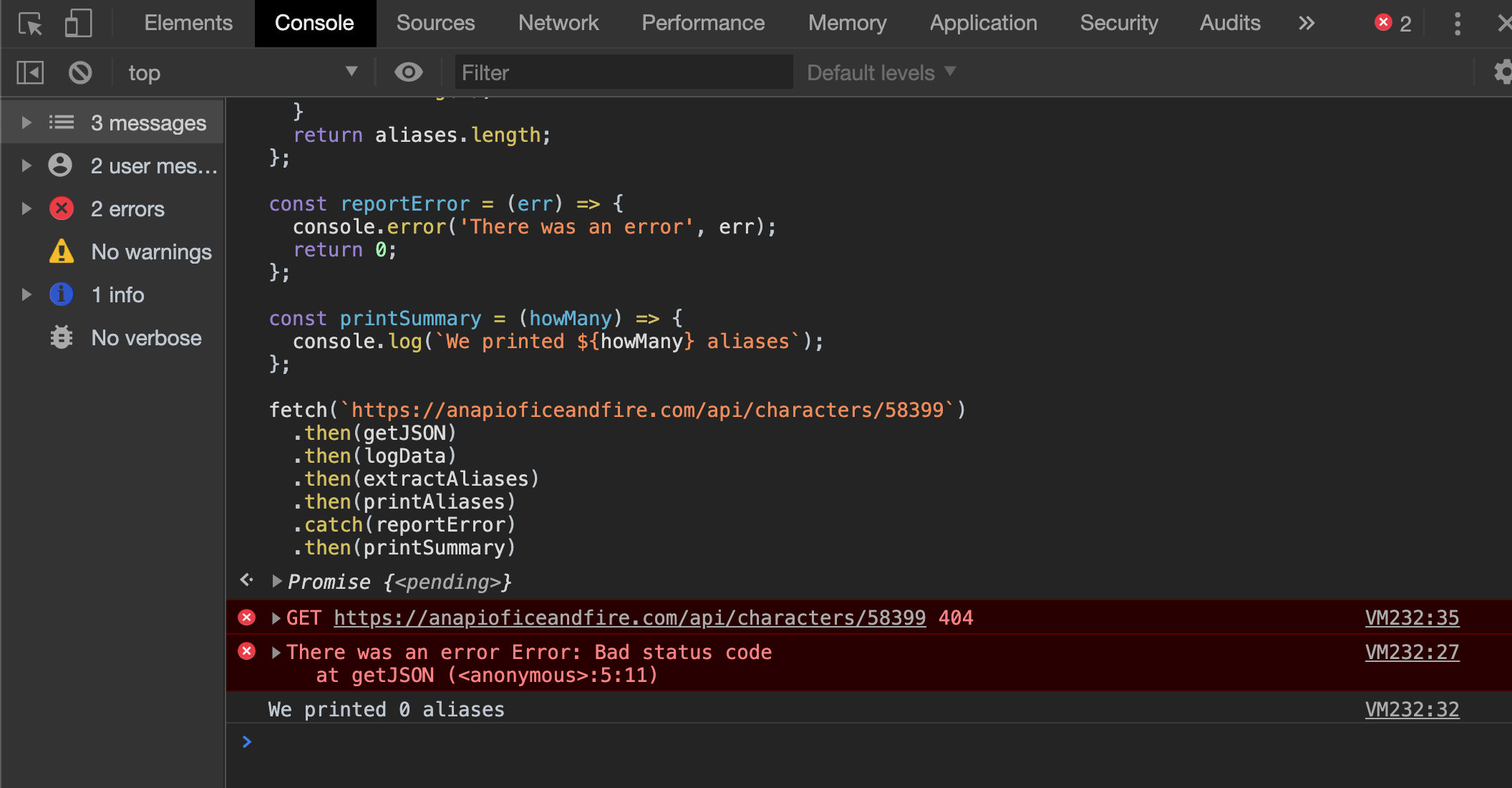
Our .catch() shows our custom Error message and returns 0 to the Promise chain.
# How do you write a function that returns a Promise?
Many newer APIs return Promises, but you may need to "wrap" some older APIs in Promise-friendly code to use them together.
Imagine that you want to use localStorage as a cache for your API data. The first time you need a value, you request it from the API and save it to localStorage. Every time you need it afterwards, you can retrieve it from localStorage.
Lets combine this with what you've just learned about custom Exceptions and fallback values.
Here's the syntax for creating a Promise:
const promise = new Promise((resolve, reject) => {
  resolve(42);
});

promise.then(value => console.log(value));
// 42
2
3
4
5
6
This Promise isn't very useful, as it only ever produces the number 42.
When creating a new Promise, you pass it an executor function. The executor function is a function that expects to receive two arguments: resolve and reject.
Inside of the executor, you can write any valid JavaScript code. But at some point, you must call either resolve() or reject() so that the promise can change its status.
If you call resolve(), the first .then() in the Promise chain will be triggered. If you call reject(), the first .catch() will be triggered.
With that in mind, you can write a function that creates a Promise which resolve()s to a value retrieved from localStorage.
const loadFromStorage = key => {
  return new Promise((resolve, reject) => {
    const raw = localStorage.getItem(key);
    if (raw) {
      const data = JSON.parse(raw);
      resolve(data);
    } else {
      reject(key);
    }
  });
};
2
3
4
5
6
7
8
9
10
11
We make sure to return our new Promise, so that we can chain .then() calls onto the end of loadFromStorage().
Inside the executor function, we write code that looks for a value in localStorage. If we find a valid value, we convert it from a JSON string into a JavaScript value, and pass that value to resolve(). If we don't find a valid value, we call reject() and pass it the key we were looking for.
In order to use our new loadFromStorage() function with the rest of our Promise chain, we'll need to modify our existing code just a bit. First, instead of starting the Promise chain with our fetch(), we start it with loadFromStorage() since that's the first place we want to look for the data.
If we don't find what we're looking for in localStorage, we need to fetch() the data from the API. To do that, we'll create a new function called retrieveFromAPI() that expects to receive the ID of the character and uses that as part of the URL.
We'll use a .catch() instead of a .then() with retreiveFromAPI(), since it should only be called if loadFromStorage() needs to reject().
const loadFromStorage = key => {
  return new Promise((resolve, reject) => {
    const raw = localStorage.getItem(key);
    if (raw) {
      const data = JSON.parse(raw);
      resolve(data);
    } else {
      reject(key);
    }
  });
};

const retrieveFromAPI = key => {
  return fetch(`https://anapioficeandfire.com/api/characters/${key}`)
    .then(getJSON);
};

//...code omitted

loadFromStorage('583')
  .catch(retrieveFromAPI)
  .then(logData)
  .then(extractAliases)
  .then(printAliases)
  .catch(reportError)
  .then(printSummary)
2
3
4
5
6
7
8
9
10
11
12
13
14
15
16
17
18
19
20
21
22
23
24
25
26
# When do I need to nest my functions (vs chaining)?
In the previous code sample, you might have noticed that we return the result of calling fetch(), but we're also chaining a .then() onto it.
We nest the call to getJSON() inside of our retrieveFromAPI() because we want to return the result of this "mini" Promise chain.
You might be tempted to do the following, but it won't work:
const retrieveFromAPI = key => {
  return fetch(`https://anapioficeandfire.com/api/characters/${key}`);
};

//...code omitted

loadFromStorage('583')
  .catch(retrieveFromAPI)
  .then(getJSON) // This will *not* work the way we expect.
  .then(logData)
  .then(extractAliases)
  .then(printAliases)
  .catch(reportError)
  .then(printSummary)
2
3
4
5
6
7
8
9
10
11
12
13
14
Why not? If we do find the correct value in localStorage and we do not reject(), the first .then() is called. The problem is that the first .then() invokes getJSON() which expects to work with a response object.
Since the value coming from localStorage() is not a response, our code will throw another exception and the next .catch() will be triggered.
Here is the correct version of our code so far:
const loadFromStorage = key => {
  return new Promise((resolve, reject) => {
    const raw = localStorage.getItem(key);
    if (raw) {
      const data = JSON.parse(raw);
      resolve(data);
    } else {
      reject(key);
    }
  });
};

const retrieveFromAPI = key => {
  return fetch(`https://anapioficeandfire.com/api/characters/${key}`)
    .then(getJSON);
};

const getJSON = response => {
  if (response.status === 200) {
    return response.json();
  } else {
    throw new Error('Bad status code');
  }
};

const logData = data => {
  console.log(data);
  return data;
};

const extractAliases = character => {
  const {aliases} = character;
  return aliases;
};

const printAliases = aliases => {
  for (let a of aliases) {
    console.log(a);
  }
  return aliases.length;
};

const reportError = (err) => {
  console.error('There was an error', err);
  return 0;
};

const printSummary = (howMany) => {
  console.log(`We printed ${howMany} aliases`);
};

loadFromStorage('583')
  .catch(retrieveFromAPI)
  .then(logData)
  .then(extractAliases)
  .then(printAliases)
  .catch(reportError)
  .then(printSummary)
2
3
4
5
6
7
8
9
10
11
12
13
14
15
16
17
18
19
20
21
22
23
24
25
26
27
28
29
30
31
32
33
34
35
36
37
38
39
40
41
42
43
44
45
46
47
48
49
50
51
52
53
54
55
56
57
58
# How do you wait for many Promises to provide values?
For the final example, imagine that you want to retrieve the allegiances (the houses they are loyal to) for a character. Currently, the API provides you with an array of URLs, with each URL pointing to the detailed information for a single house.
First, you could write a function that can do a fetch() and getJSON() for a single house:
const fetchHouse = houseURL => fetch(`https://anapioficeandfire.com/api/houses/${houseURL}`)
  .then(getJSON);
2
fetchHouse() implicitly returns the Promise chain produced by the fetch().
We can now use that function to transform an array of URLs into an array of Promises in a new retreiveHousesFromAPI() function.
const fetchHouse = houseURL => fetch(`https://anapioficeandfire.com/api/houses/${houseURL}`)
  .then(getJSON);

const retrieveHousesFromAPI = houses => {
  const fetchArray = houses.map(houseURL => fetchHouse(houseURL));
  return Promise.all(fetchArray);
};
2
3
4
5
6
7
Notice that the function returns the result of passing our fetchArray to Promise.all().
Promise.all() returns a Promise that will resolve after all of the Promises in the array are resolved.
The retrieveHousesFromAPI() function can be used in conjunction with two more functions: one to extract the allegiances array from a character object, and another that replaces allegiances with the data from the API.
const fetchHouse = houseURL => fetch(`https://anapioficeandfire.com/api/houses/${houseURL}`)
  .then(getJSON);

const retrieveHousesFromAPI = houses => {
  const fetchArray = houses.map(houseURL => fetchHouse(houseURL));
  return Promise.all(fetchArray);
};

const extractHousesFromCharacter = character => {
  const {allegiances} = character;
  return houses;
};

const addHousesToCharacter = character => {
  return retrieveHousesFromAPI(extractHousesFromCharacter(character))
    .then(houseArray => {
      character.allegiances = houseArray;
      return character;
    });
};
2
3
4
5
6
7
8
9
10
11
12
13
14
15
16
17
18
19
20
In addHousesToCharacter(), we chain a .then() onto our call to retrieveHousesFromAPI() and pass it an anonymous function. That anonymous function receives the array that is resolved by Promise.all().
TIP
Promise.all() preserves the order of the array of Promises that you pass to it. The function you pass to .then() will receive an array whose values correspond to the original array of Promises.
# Training Exercises
# Small
# Stopwatch
Create a simple stopwatch app that starts the timer and shows the stopped time.
- Start the stopwatch with a promise
- End the stopwatch on a random time between 1-10 seconds
- When the stopwatch stops, display the time it took
# Medium
# The Tortoise and the Hare
Create two animals (a tortoise and a hare) that race each other.
- Start each animals with a separate promise
- End each promise on a random time between 1-10 seconds
- Display the winner (or determine if it's a tie)
- Display the total time it took for each animal
# 1. Creating a Promise logger()
Write a logger() function that =console.log()=s the argument it was passed, and returns it.
Add the logger() to one of your small exercises to show what values are being passed through the Promise chain.
Try using it multiple times within a single Promise chain.
# 2. Sorting and filtering Jon Snow's aliases
Add a processing step to the sample code that sorts Jon Snow's aliases alphabetically. Add another step that filters out any aliases that do not begin with the word "The".
# 3. Listing the characters in a book
For a single book in the API (e.g., https://anapioficeandfire.com/api/books/1), there is a key named povCharacters that contains an array of character URLs.
Create a Promise chain that displays the name and released date for a book. Incorporate Promise.all() to show all the name of all of the povCharacters for that book.
# Large
# 1. Game of Thrones character browser
The Game of Thrones API provides a way to retrieve pages of characters. Read the documentation so that you can fetch() 25 characters at a time.
Display the names of each character in a list (filtering out any characters that do not have a name). Make each one a link that
# 2. Show today's weather
Create a new app (with an index.html and an index.js) that uses data from the OpenWeather API.
Retrieve the current weather for your city using fetch() and create a pipeline of .then() functions that draw the data to the page.
Make sure to .catch() any errors that might occur.
Once you can retrieve the weather for a hard-coded city, try using the browser's Geolocation API to automatically find the user's location.
The Geolocation API is asynchronous, but uses the callback style. Wrap these API calls in a new Promise so that it can be incorporated into your Promise chain.
# 3. Movie search
Create a new app that lets the user search for movies by title. Sign up for an API key and use the data from the Open Movie Database or from The Movie DB.
Provide the user with a form so that they can enter a movie title. On submit, make the fetch() request to the API. Add a Reset button that clears the form and the movie information on the page.
After you have confirmed that you can successfully fetch() data and .catch() errors, cache the data to localStorage so that your app doesn't need to make a network request for any locally stored movie data.
# 4. Horse Race
Create a horse race simulation.
- Create a race with at least 5 racers
- Start each racer at the exact same time
- Randomly generate a random time for each racer between 1-10 seconds (allow floats/decimals)
- Display the times only after all of the racers are done
# Interview Questions
# Bugfix: Cannot read property 'then' of undefined
The following code should print a list of users to the console. But, running it causes the error Uncaught TypeError: Cannot read property 'then' of undefined. What does this error mean and what would you change so that it exhibits the correct behavior?
const getUsers = () => {
    fetch(API)
      .then(r => r.json());
};

const main = () => {
    getUsers()
      .then(users => {
        console.log(users);
      });
};

main();
2
3
4
5
6
7
8
9
10
11
12
13
Solution
In the main() function, a .then() is chained on to the end of the call to getUsers(). But, getUsers() does not return a value. Therefore, it is implicitly returning undefined.
The getUsers function needs to return the Promise produced by the fetch.
const getUsers = () => {
    return fetch(API)
      .then(r => r.json());
};

const main = () => {
    getUsers()
      .then(users => {
        console.log(users);
      });
};

main();
2
3
4
5
6
7
8
9
10
11
12
13
Do you know another way to return a value from an arrow function?
# Architect: Cache the data to a second API
This code currently retrieves data from an API. In addition to displaying the data on the console, modify the code so that it saves the data to a second API.
const SOURCE_URL = "https://first.api.com";

const retrieveData = () => {
    return fetch(SOURCE_URL)
             .then(response => response.json());
};

const main = () => {
    retrieveData()
        .then(data => {
            console.log(data);
        });
};

main();
2
3
4
5
6
7
8
9
10
11
12
13
14
15
Solution
Create a new function saveData whose responsibilities are:
- receive the
datafrom the first API POSTthedatato the second APIreturnthedataback to the Promise chain
Once the saveData function exists, it can be added to the Promise chain in the main() function.
const SOURCE_URL = "https://first.api.com";
const SAVE_TO_URL = "https://other.api.com";

const saveData = (data) => {
    return fetch(SAVE_TO_URL, {
        method: 'POST',
        headers: {
            'Content-Type': 'application/json',
        },
        body: JSON.stringify(data)
    }).then(() => {
        return data;
    });
};

const retrieveData = () => {
    return fetch(SOURCE_URL)
             .then(response => response.json());
};

const main = () => {
    retrieveData()
        .then(saveData)
        .then(data => {
            console.log(data);
        });
};

main();
2
3
4
5
6
7
8
9
10
11
12
13
14
15
16
17
18
19
20
21
22
23
24
25
26
27
28
29
# Conceptual: Pros and Cons
What are some advantages and disadvantages of using Promises vs Callbacks?
Solution
Callbacks are best for smaller programs that do not involve multiple asynchronous steps. In these cases, breaking your code into pure functions can be tedious and less readable.
Though it takes more effort up front, Promises are cleaner for complex asynchronous code, especially when multiple, interdependent steps are needed. Additionally, because each step is a pure function, it is more modular, allowing teams to reorder,refactor, and debug individual steps.